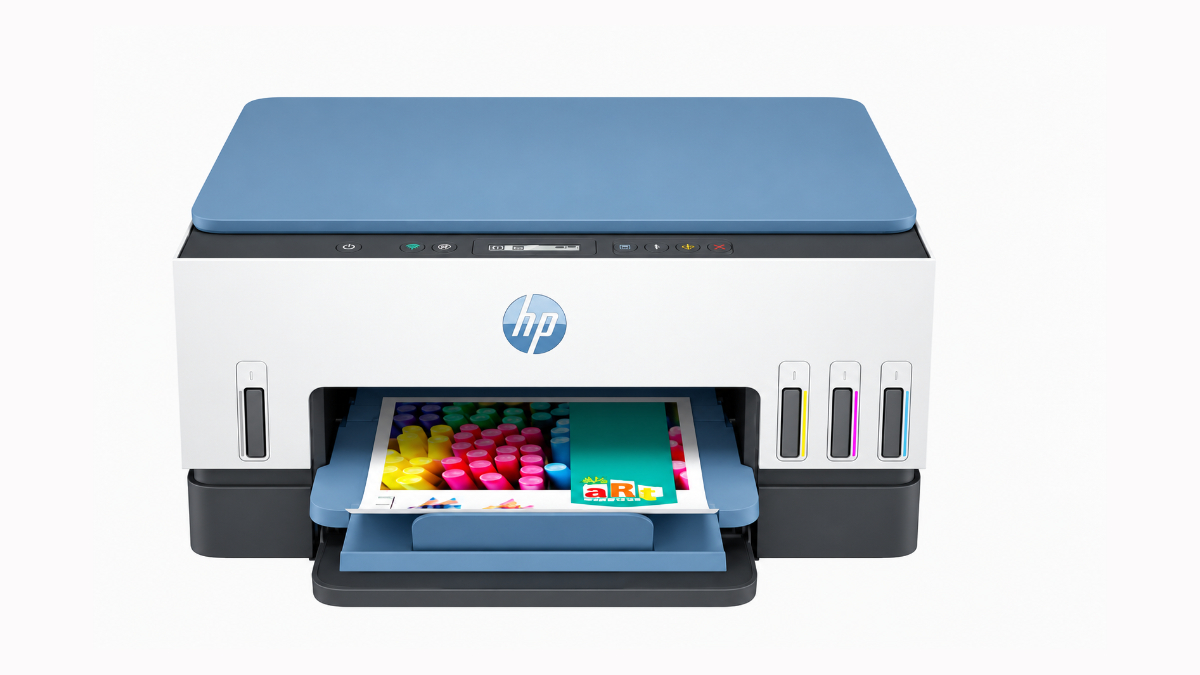
New Delhi [India], October 26: For a family that regularly prints homework, colour projects and everyday documents, the HP Smart Tank 580 is a practical starting point. The Smart Tank 720 adds automatic two-sided printing for longer study packs. Occasional users may prefer the HP DeskJet Ink Advantage 2878, while households printing mainly text can use a monochrome laser.
The right choice depends on what your family prints, how often the printer is used and which tasks need to happen at home. These eight options suit different household routines.
How These Printers Were Compared
A family printer may serve a child completing an assignment, a parent printing a form and someone saving copies of certificates. Each person needs a slightly different feature.
The models below were compared using manufacturer specifications for colour printing, scanning, copying, wireless connectivity, paper handling and print speed. Running costs and practical limitations also inform the recommendations.
These are specifications-based recommendations rather than results from hands-on testing. Prices, availability and included supplies can change, so check the exact Indian product listing before purchase.
Quick Comparison For Family Printing
All eight entries offer printing, scanning and copying. The table highlights the differences that affect their usefulness at home.
| Printer | Printing Technology | Two-Sided Printing | Main Family Use |
| HP DeskJet Ink Advantage 2878 | It uses ink cartridges. | It requires manual paper handling. | It suits occasional forms and homework. |
| HP Smart Tank 580 | It uses refillable ink tanks. | It requires manual paper handling. | It suits regular colour schoolwork. |
| HP Smart Tank 585/589 | They use refillable ink tanks. | They require manual paper handling. | They suit shared everyday colour printing. |
| HP Smart Tank 720 | It uses refillable ink tanks. | It turns supported sheets automatically. | It suits longer colour study documents. |
| HP Laser MFP 1188w | It uses monochrome laser technology. | It requires manual paper handling. | It suits mainly text documents. |
| Epson EcoTank L3252 | It uses refillable ink tanks. | It does not offer automatic duplex. | It suits schoolwork and small photos. |
| Canon PIXMA G3770 | It uses refillable ink tanks. | It does not offer automatic duplex. | It suits colour projects and crafts. |
| Brother DCP-L2541DW | It uses monochrome laser technology. | It turns supported sheets automatically. | It suits document-heavy family routines. |
Understand Your Family’s Printing Needs First
Count Pages Across The Whole Household
Add together the pages everyone prints during a typical month. Include worksheets, office documents, applications and activity sheets. A child’s ten-page assignment and a parent’s thirty-page report belong in the same total.
Also note busy periods, such as exams. A household printing small amounts most weeks may still need convenient paper handling during revision season.
Recommended monthly volume describes the usage range a manufacturer suggests. A duty cycle is a maximum capacity figure, so it should not become your routine printing target.
Decide Whether Colour Is Essential
Colour helps with labelled diagrams, maps and pictures where different shades carry information. If those pages appear regularly, a colour printer is more useful than a monochrome model.
For plain notes, letters and forms, black-and-white printing may be sufficient. You can still use a print shop for occasional colour work if that arrangement suits your schedule.
Match Scanning To The Documents You Handle
A flatbed scanner has a glass surface where you place one original at a time. It suits certificates, identification documents and pages from books.
An automatic document feeder, or ADF, feeds a stack of loose pages through the scanner. It saves repeated lifting of the lid when you scan several documents. An ADF does not automatically mean the printer scans both sides without assistance.
Read Print Speeds In Context
Pages per minute and images per minute describe output speed under specified conditions. ISO figures use standardised test methods, which makes them more useful than draft speeds for everyday comparisons.
They still do not predict every job. A page covered with photographs can take longer than a simple letter. Sending the file, processing it, and producing the first sheet also take time. For short jobs, convenience may matter more than the headline speed.
Eight Printers For Different Family Routines
1. HP DeskJet Ink Advantage 2878 For Occasional Homework And Forms
The HP DeskJet Ink Advantage 2878 makes sense when your family prints a few documents rather than large batches. It prints in colour, scans and copies, with Wi-Fi for sharing it across compatible devices.
HP lists ISO speeds of up to 7.5 pages per minute in black and 5.5 in colour. Its recommended monthly volume is 50 to 100 pages. Those figures place it closer to light household use than a busy study or work setup.
Its flatbed can copy a signed form or scan a certificate. However, double-sided printing requires you to turn and reload sheets, and documents must be placed on the scanner individually.
The cartridge system is straightforward, but replacement costs deserve attention. HP lists two cartridges, one black and one containing the three colours. Check the correct replacement cartridge numbers before purchase.
When not to buy: Avoid this model if your family regularly prints hundreds of pages or needs automatic duplex for long documents.
2. HP Smart Tank 580 For Regular Colour Schoolwork
The HP Smart Tank 580 suits a household where colour printing is part of the weekly routine. Refillable tanks make it worth assessing for worksheets, illustrated assignments and activity pages.
It provides printing, scanning and copying, with wireless connectivity. HP lists ISO speeds of up to 12 pages per minute in black and 5 in colour, plus a recommended monthly volume of 400 to 800 pages.
The current HP India listing advertises included ink for up to 8,000 black or 6,000 colour pages. These are test-based yield estimates, not a promise that every household will print that many pages.
For a family, the main benefit is having one colour device for several recurring tasks. You can scan a completed worksheet, copy a permission slip and print project material from the same machine.
When not to buy: Choose another option if automatic two-sided printing or scanning stacks of documents is essential. This model uses manual duplex and a flatbed scanner.
3. HP Smart Tank 585/589 For Shared Everyday Colour Printing
The HP Smart Tank 585 and Smart Tank 589 belong together because their core family-printing functions are similar. Both offer colour printing, scanning, copying and Wi-Fi, with manual duplex.
Their listed speeds reach 12 pages per minute in black and 5 in colour. They can handle everyday learning material without requiring a separate scanner for household paperwork.
Do not assume a different model number means a major improvement. Compare the exact product code, supplied ink bottles, warranty terms and current selling price. A retailer’s bundle may differ from another listing for a closely related printer.
These models are useful alternatives when their purchase package fits your requirements better than the 580. Their similar working role makes the package comparison more meaningful than choosing by name alone.
When not to buy: Skip them if you expect automatic duplex or an ADF. Those features should be confirmed explicitly rather than inferred from the Smart Tank name.
4. HP Smart Tank 720 For Longer Study Packs And Shared Work
The HP Smart Tank 720 earns its place through automatic duplex. It turns supported sheets inside the printer, reducing manual work during longer assignments and revision notes.
HP lists ISO speeds of up to 15 pages per minute in black and 9 in colour. Its 250-sheet input capacity also means fewer paper reloads than a small tray during a substantial print job.
It prints, scans and copies, and supports wireless printing. Borderless printing up to A4 adds flexibility for illustrated pages and suitable photo projects.
A family sharing one printer for education and work may appreciate these paper-handling features more than an occasional user would. Automatic duplex is particularly helpful when someone needs a report while another person is finishing an assignment.
The scanner remains a flatbed. Automatic two-sided printing does not make scanning a stack of originals automatic.
When not to buy: Its extra capabilities may be unnecessary for a few monthly pages. It is also unsuitable if your main requirement is an ADF.
5. HP Laser MFP 1188w For Mostly Black-And-White Documents
The HP Laser MFP 1188w fits families printing text more often than pictures. Think of typed notes, forms, reading material and work documents where colour adds little value.
HP specifies black printing at up to 22 pages per minute and a recommended monthly volume of 100 to 2,000 pages. The machine also scans and copies, so everyday document tasks remain available.
Its laser technology uses toner powder rather than liquid ink. That removes the particular concern of ink drying in printhead nozzles, although the printer still needs normal care and compatible replacement supplies.
Wireless connectivity helps family members share it. Manual duplex means you must reload paper for the second side, so assess that limitation if most jobs are long.
When not to buy: It cannot print in colour. Avoid it as your only printer if coloured diagrams, photographs or visual assignments are a regular requirement.
6. Epson EcoTank L3252 For Schoolwork And Small Family Photos
The Epson EcoTank L3252 combines refillable colour tanks with printing, scanning and copying. It supports Wi-Fi and Wi-Fi Direct, giving families options for printing from compatible phones and computers.
Epson lists ISO speeds of up to 10 images per minute in black and 5 in colour. Its borderless photo support extends to 4R, commonly understood as approximately 4 by 6 inches.
That photo size suits small album prints, family snapshots and pictures for a child’s project. Borderless means the picture can reach the paper’s edges, rather than leaving a white margin.
Epson’s mobile software can help with setup and everyday control. Check support for the devices your family already owns, especially if an older computer will remain connected.
When not to buy: It lacks automatic duplex, and its borderless photo size should not be mistaken for A4 borderless capability. A different model may suit larger edge-to-edge projects.
7. Canon PIXMA G3770 For Colour Projects And Craft Work
The Canon PIXMA G3770 is another refillable colour option for families using a printer creatively. It prints, scans and copies, with wireless connectivity and a small LCD for operating the device.
Canon lists A4 ISO speeds of up to 11 images per minute in monochrome and 6 in colour. Borderless printing supports suitable photo and project work, while its recommended monthly volume is 150 to 1,500 pages.
Its role is broader than printing family photographs. A household could use it for illustrated learning sheets, scrapbook pictures and simple craft designs on supported paper.
Paper compatibility matters here. A printer that handles photo paper does not necessarily accept every thick card, adhesive sheet or craft material. Check the specified media types and weight limits before feeding unfamiliar stock.
When not to buy: It does not offer automatic duplex. Avoid choosing it solely for crafts unless your intended paper and print sizes are supported.
8. Brother DCP-L2541DW For Busy Family Document Routines
The Brother DCP-L2541DW suits a household where substantial document jobs are common. It prints in black and white, with speeds of up to 30 pages per minute and automatic two-sided printing.
Its 250-sheet paper tray and 35-sheet ADF give it a different role from the simpler flatbed models. Parents handling paperwork and students scanning loose notes can use the feeder instead of placing each sheet separately.
The ADF is intended for suitable loose documents. Bound books, fragile originals and identification cards should be handled through the appropriate flatbed procedure rather than pushed into the feeder.
This is also a larger machine to accommodate. At about 11.2 kg, it needs a stable surface where the scanner and paper tray remain accessible.
When not to buy: It is unsuitable for colour output or family photo printing. Its document-handling features may be excessive if the printer rarely receives more than one page.
Check Running Costs Before Paying
Purchase price covers only the machine. Your ongoing expenses include replacement ink or toner, paper and any maintenance items specified for the model.
Use these checks to assess the likely cost:
- Find the current price of the correct replacement supplies.
- Compare their stated yields using the same printing conditions wherever possible.
- Keep included supplies separate from replacement bottle or cartridge yields.
- Allow for photo paper if photographs are part of your routine.
For example, a supply costing ₹1,000 with a stated yield of 1,000 pages gives an estimated supply cost of ₹1 per page. This illustration excludes paper and maintenance. Actual costs change with page coverage, cleaning and the documents printed.
An ink-tank printer may require a larger initial payment than a basic cartridge model. Its lower supply cost per page becomes more valuable as regular printing increases. Compare the purchase price and expected supply spending over the same period. If you print very little, paying more upfront may take longer to deliver worthwhile savings for your family.
Make Shared Printing Easy At Home
Place the printer within reliable wireless coverage, with room for the trays and scanner lid. A shelf that fits the closed machine may still be too shallow during use.
Before buying, check the manufacturer’s current driver and app support for each household device. Wi-Fi alone does not confirm compatibility with every operating system.
After setup, print a short document from each device. Keep everyday paper nearby and show family members how to cancel an incorrect job. Use print preview to catch blank pages, poor scaling, and unwanted copies before they consume supplies.
Keep the receipt with your printer’s warranty details.
Final Recommendation
The best printer for family use is the one that handles your household’s regular work without adding unnecessary expense or effort.
Start with the HP Smart Tank 580 for recurring colour schoolwork. Move to the Smart Tank 720 if automatic duplex will save time. For light use, the DeskJet 2878 is a more modest starting point. Text-focused families can assess the Laser MFP 1188w or Brother DCP-L2541DW.
Explore the HP home printer range, then match the exact model to your page volume, document types and available space.
FAQs
Can A Monochrome Laser Printer Scan Colour Documents?
Yes, some can. Monochrome describes the printed output, not necessarily the scanner. Check the scanning specifications separately if you need to save certificates or pictures in colour.
Does Printing In Black Use Only Black Ink?
Not always. Inkjet printers may use colour ink during maintenance or under particular print settings. Follow the model’s guidance rather than assuming colour supplies will never need replenishment.
Can Children Use A Family Printer Independently?
Older children can learn basic printing with guidance. An adult should handle initial setup and supervise ink refilling, supply replacement, and jam removal according to the manufacturer’s instructions.
Should A Family Buy A Separate Photo Printer?
Usually, occasional snapshots do not justify a second machine. Check the colour printer’s supported photo sizes first. A dedicated photo device becomes more relevant when photographic output is a frequent, specialised requirement.
If you object to the content of this press release, please notify us at [email protected]. We will respond and rectify the situation within 24 hours.